
AccessAccord1.2.2 - App Store
You'll be able to see results in few seconds.
Publisher Description
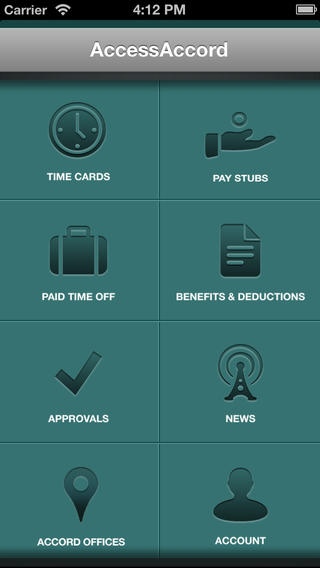
The AccessAccord app is an integrated mobile complement to the AccessAccord self service website (www.accordhr.com). It extends many of the payroll, HR and benefits features to your iPhone.
This app is only intended for the employees of our clients. If you already have an AccessAccord account you can log in with your existing employee username and password. After logging in, you will be asked to set a 4-digit PIN to allow easier access from your phone, and to prevent unauthorized access.
Once inside you will be able to do the following. Not all employers use all features.
View pay stubs see your paychecks, including wage, tax & benefit details and year to date information. Paychecks are viewable as soon as they are processed.
Clock in and out you can punch in and out of the online timeclock. Depending on your employers settings, your location may be recorded.
Review your timecard you can review your timecard, making sure your punches for the pay period are correct. If everything is correct you can submit the timecard to your supervisor for approval.
View paid time off balances see how much vacation, sick and/or personal time you have remaining
Schedule time off send a time off request to your supervisor for scheduled time off
Benefits view your current benefit elections and the per-paycheck deduction amounts
Flex spending view your Section 125 flexible spending account balances, claim information and ability to submit receipts
Approvals managers are able to review, approve and deny timecards and paid time off requests
Announcements you can see announcements from your employer and from Accord
If you are an employee at one of our clients and you don t have an AccessAccord account, you can register for one right in the app. You will need an email address and either a recent pay stub or with a registration code provided by your employer.
Having trouble with the app? Please email us at appledev@accordhr.com and let us know what is going on.
Accord Human Resources is an employer services company, also known as a Professional Employer Organization, or PEO. We help small to medium-sized businesses improve productivity and profitability by providing comprehensive, outsourced human resource management solutions.
While the client, or work-site employer, maintains management and control of day-to-day business activity, Accord takes responsibility for the non-core, administrative functions of employment. Accord provides human resource administration, including the management of administrative and regulatory burdens associated with personnel management. The owners and key managers of the company are thereby freed to focus on core business objectives and goals.
Requires iOS 4.3 or later. Compatible with iPhone, iPad, and iPod touch.
About AccessAccord
The company that develops AccessAccord is Accord Human Resources. The latest version released by its developer is 1.2.2.
To install AccessAccord on your iOS device, just click the green Continue To App button above to start the installation process. The app is listed on our website since 2012-05-16 and was downloaded 0 times. We have already checked if the download link is safe, however for your own protection we recommend that you scan the downloaded app with your antivirus. Your antivirus may detect the AccessAccord as malware if the download link is broken.
How to install AccessAccord on your iOS device:
- Click on the Continue To App button on our website. This will redirect you to the App Store.
- Once the AccessAccord is shown in the iTunes listing of your iOS device, you can start its download and installation. Tap on the GET button to the right of the app to start downloading it.
- If you are not logged-in the iOS appstore app, you'll be prompted for your your Apple ID and/or password.
- After AccessAccord is downloaded, you'll see an INSTALL button to the right. Tap on it to start the actual installation of the iOS app.
- Once installation is finished you can tap on the OPEN button to start it. Its icon will also be added to your device home screen.
Program Details
System requirements
Download information
Pricing
Version History
version 1.2.2
posted on 2012-05-16
Disclaimer
Official App Store Link
We do not host AccessAccord on our servers. We did not scan it for viruses, adware, spyware or other type of malware. This app is hosted by Apple and passed their terms and conditions to be listed there. We recommend caution when installing it.
The App Store link for AccessAccord is provided to you by apps112.com without any warranties, representations or guarantees of any kind, so access it at your own risk.
If you have questions regarding this particular app contact the publisher directly. For questions about the functionalities of apps112.com contact us.
